

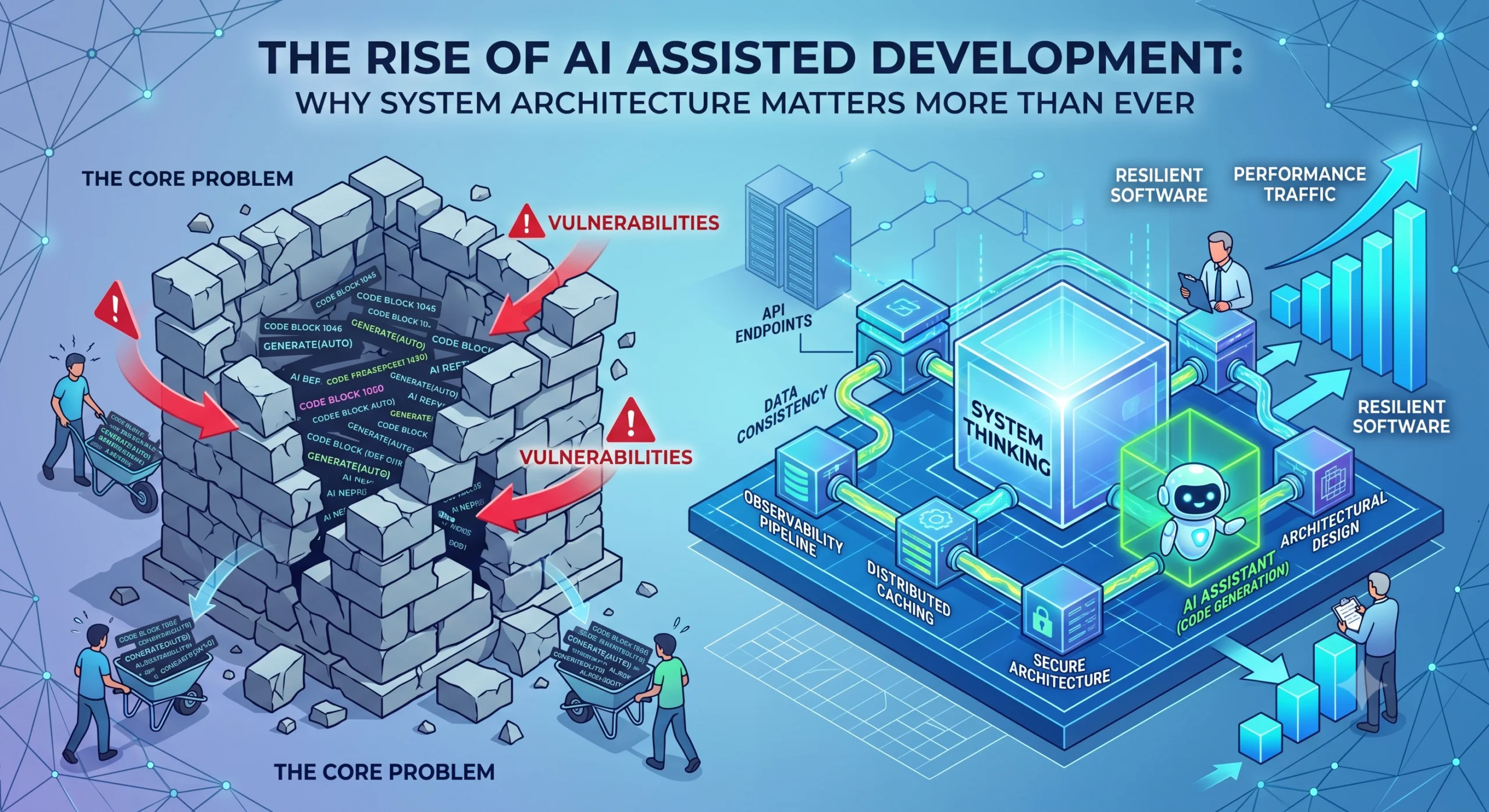
The way we write software is changing faster than at any point since the adoption of high-level languages. Generative AI tools are exceptionally proficient at streamlining repetitive tasks, explaining complex logic blocks, and suggesting quick refactors. But speed does not equal quality, and this shift introduces a critical engineering dilemma. The Core Problem The adoption of AI coding assistants fundamentally changes the developer’s workflow. If junior developers blindly accept AI generated output without a fundamental understanding of how software operates beneath the syntax layer, they risk introducing massive vulnerabilities and structural flaws. The visual metaphor is stark: you may be able to generate code “bricks” faster than ever, but if they are poorly stacked, you are simply building a structure that is guaranteed to collapse. The Engineering Reality For decades, developers were evaluated primarily on their ability to memorize syntax and write raw code. That definition is now obsolete. In modern engineering, the role of a developer overlaps heavily with architecture, security protocol enforcement, and system performance tuning. Modern backend engineering requires a deep understanding of concepts that AI cannot fully grasp in isolation. An engineer must comprehend: Distributed systems and their trade-offs. API versioning strategies. Data consistency across caches and databases. Robust observability pipelines. If a developer does not understand these architectural principles, the system will fail spectacularly when subjected to production traffic. The Architectural Fix To build resilient software in an era of AI assistance, engineering teams must refocus on system fundamentals. Training should prioritize problem solving and system thinking over learning the newest trending framework. Employers and technical leads are increasingly prioritizing practical skills and architectural awareness. Developers who succeed in this landscape master one domain deeply, understand the intricacies of scaling monolithic versus microservice architectures, and build systems with a defensive programming mindset from day one. The tools may generate the code, but the human engineer must still design the system responsibly. The era of the pure “syntax memorizer” is over; the era of the “system architect” is now mandatory.

The Narrative: From Monolith to Modernity
The overarching narrative is one of liberation. “Escaping the Monolith” sets the stage for a classic problem in software development. “Cloud Native Architecture and Platform Engineering” are the tools and methods used for that escape, leading to a state of improved efficiency, speed, and scalability. Part 1: The Challenge – The Monolithic System What is a Monolith? A monolithic architecture is a traditional model for software development. The entire application is built as a single, indivisible unit. All components—the user interface, business logic, data access layer, and integrations—are tightly coupled and deployed together as one piece of software. It often shares a single database. Why Do Organizations “Escape” It? (The Pain Points) While monoliths have advantages for small projects (simplicity, single point of deployment), they become a significant hindrance as the application and team grow. Organizations decide to “escape” for several critical reasons: Slow and Rigid Deployment Cycles: Changing even one small piece of code requires rebuilding, retesting, and redeploying the entire application. This leads to “big bang” deployments, which are rare, high-risk, and slow innovation. Scalability Issues: You must scale the entire application, even if only one specific module is under load. This is inefficient and costly. Tight Coupling and Dependency Hell: Over time, components become hopelessly intertwined. Changing a feature in one part of the code can cause unexpected breakages in distant, seemingly unrelated areas. Testing becomes a nightmare. Technology Lock-in: The entire monolith is typically built with a single technology stack (e.g., all Java, all .NET). This makes it difficult to adopt new, better languages or frameworks for specific functionalities. Difficulty for New Developers: For large systems, the codebase becomes so massive and complex that new developers face a steep learning curve before they can make productive contributions. Part 2: The Goal – Cloud Native Architecture “Cloud Native Architecture” is the target state—the new paradigm that promises to solve the problems of the monolith. It is an approach to building and running applications that exploits the advantages of the cloud computing model. Key Pillars of Cloud Native Cloud native is not just about where you run your app (in the cloud), but how you design it. The Cloud Native Computing Foundation (CNCF) outlines several core pillars: Microservices: This is the direct architectural alternative to the monolith. You break down the large, single application into small, independent, and loosely coupled services. Each service is built around a specific business capability, has its own data store (ideally), and communicates via well-defined APIs. This enables independent development, scaling, and deployment. Containers: Microservices are often packaged and run inside containers (like Docker). Containers isolate the application and its dependencies into a single package that can run reliably across any environment (dev, test, production). Container Orchestration (e.g., Kubernetes): Managing hundreds or thousands of containers is impossible manually. Container orchestration platforms like Kubernetes automate the deployment, scaling, and management of containerized applications. Continuous Delivery (CI/CD): A high degree of automation is required. Code changes should be automatically tested, built, and frequently deployed to production with minimal risk. Dynamic Infrastructure and DevOps: The architecture should utilize APIs provided by the cloud provider to dynamically manage resources (like databases and compute). This is enabled by a DevOps culture of collaboration and automation. Benefits of the Cloud Native State Moving to a cloud-native architecture offers several game-changing benefits: Agility and Speed to Market: Teams can deploy updates for their specific microservice independently, allowing for faster experimentation and innovation. Scalability: Each microservice can be scaled independently based on its own traffic patterns, optimizing resource usage. Resilience and Fault Tolerance: If one microservice fails, it doesn’t bring down the entire application. The system can self-heal. Improved Developer Productivity: Developers work on smaller, more understandable codebases, and the “dependency hell” is largely eliminated. Part 3: The Enabler – Platform Engineering This is the newest and perhaps most critical element in the sequence. While cloud-native offers great promise, the reality of managing microservices, Kubernetes, and intricate cloud infrastructure introduces immense operational complexity. “Escaping the Monolith” and adopting “Cloud Native” without a proper enabling layer often leads to a new problem: “Kubernetes Hell” or “Ops Burnout.” Every developer is forced to become an infrastructure expert, spend hours setting up CI/CD pipelines, and manage security, which distracts them from writing business value code. This is where Platform Engineering comes in. What is Platform Engineering? Platform Engineering is the discipline of building and operating Internal Developer Platforms (IDPs). An Internal Developer Platform is a self-service layer that abstracts away the underlying infrastructure and operational complexity, providing developers with everything they need to build, deploy, and run applications quickly and securely. Core Functions of a Platform Engineering Team: Build “Golden Paths”: The platform team creates pre-approved, automated, and secure configurations for common tasks (e.g., “spinning up a new microservice,” “deploying to production,” “creating a PostgreSQL database”). This creates a “paved road” for 90% of development needs, promoting best practices. Enable Self-Service: Developers should not have to file tickets for routine infrastructure requests. The IDP provides a self-service interface (CLI or UI) to perform these tasks. Abstract Infrastructure Complexity: Developers do not need to be experts in Kubernetes manifests or Terraform. The IDP translates simple requests into complex infrastructure-as-code actions. Provide Governance and Compliance: The platform team bakes security, compliance, and budget guardrails directly into the infrastructure and workflows, ensuring everything is built securely by default. Focus on “Developer Experience” (DevEx): The ultimate goal is to make the application development process as smooth and frictionless as possible. The platform should “delight” the developers, not be an obstacle. The Relationship: Platform Engineering as a Catalyst Platform Engineering makes Cloud Native possible at scale. It solves the human and operational challenges of a microservices and container-based architecture. By enabling a true DevOps culture (developers can “own” their service because the platform makes the operational parts easy), Platform Engineering becomes the essential bridge that makes “Escaping the Monolith” successful and sustainable. Conclusion: The New Way of Working The journey described by your title is the standard evolution

Outsourcing and Digital Transformation: What Actually Works
Companies outsource digital transformation for good reasons. They lack in-house engineering capacity. They need to move faster than hiring allows. They want to control costs instead of building a permanent team. These are valid motivations. The problem is that most outsourcing efforts fail before the first line of code gets written. We have seen it from both sides. As a Sri Lankan software company founded in 2023 by three engineers, Helixz Solutions takes on outsourced transformation work regularly. Some clients arrive with clear goals and strong internal ownership. Others arrive with a budget and a vague wish. The difference in outcomes is stark. This post covers what actually works when you outsource digital transformation, the mistakes that sink projects, and how to pick a partner worth trusting with your systems. Why Companies Outsource Digital Transformation The reasons usually fall into three categories. Lack of in-house expertise. Most companies do not employ specialists in cloud migration, API integration, mobile development, and data engineering all at once. Building that team through hiring takes six to twelve months. Outsourcing gives you access to people who have done this work before, across multiple industries. Speed. A dedicated external team can start within weeks. You skip recruiting, onboarding, and ramp-up time. For a company facing competitive pressure or an aging system nearing failure, that speed matters more than perfect cost optimization. Cost. Outsourcing to a market like Sri Lanka, where engineering talent is strong but rates are lower than North America or Western Europe, reduces spend without cutting quality. The math works when the work is well-defined. It falls apart when cost becomes the only factor in the decision. The companies that succeed treat outsourcing as a capability decision, not a procurement decision. They ask what skills they need, how fast they need them, and what outcomes they expect. Then they find a partner who can deliver. The Common Mistakes That Sink Outsourced Transformations Most failures share the same root causes. Here are the ones we see repeatedly. Treating It as a Pure Cost Play When the primary goal is spending less money, everything else suffers. The cheapest vendor wins the contract. Requirements get trimmed to fit the budget. Quality drops. The project either ships late, ships broken, or never ships at all. You save money on paper and lose far more in rework, delays, and lost business. Cost matters. It should never be the deciding factor above competence and fit. Not Defining Outcomes “We want to digitally transform” is not an outcome. “Reduce order processing time from three days to four hours by replacing the manual workflow with an automated system” is an outcome. Vendors cannot deliver what you cannot define. When the goal is vague, the vendor guesses, and the result rarely matches what leadership had in mind. Write down the specific business outcomes before you talk to a single vendor. Measure success against them. No Internal Ownership This is the most damaging mistake. A company hands the entire transformation to an external team and walks away. No internal product owner. No technical counterpart. No one accountable for decisions, priorities, or alignment with business goals. Outsourcing shifts execution, not accountability. You still need someone inside your company who owns the outcome, makes tradeoff decisions, and keeps the project connected to real business needs. Without that person, the vendor works in a vacuum and you get software nobody uses. Picking the Cheapest Vendor The cheapest bid almost always costs the most in the end. Low bids assume optimistic timelines, minimal scope, and junior engineers doing senior work. Change requests pile up. Deadlines slip. You either pay more to fix the problems or start over with a different vendor. Evaluate vendors on technical depth, relevant experience, and communication first. Consider cost after you have a shortlist of qualified partners. Outsourcing Models: Project-Based, Dedicated Team, Hybrid The model you choose shapes how the work gets done. There is no universal best option. There is the right option for your situation. Project-Based You define the scope, timeline, and deliverables upfront. The vendor commits to a fixed price and hands over the finished work. This model works well for well-defined projects with stable requirements. A marketing website rebuild. A point integration between two systems. A mobile app with a clear feature list. It fails when requirements are uncertain or likely to change. Digital transformation projects usually involve discovery and unexpected complexity. Every change becomes a negotiation, and the relationship turns adversarial. Dedicated Team You hire a team from the vendor that works exclusively on your projects. You manage priorities and direction. The vendor handles team composition, retention, and infrastructure. This model fits ongoing transformation work where priorities shift and the scope is large. You get continuity, deep knowledge of your systems, and flexibility to redirect the team. The cost is higher commitment, usually a minimum engagement period, and the need for strong internal product management. Hybrid A core dedicated team handles the main work, supplemented by project-based resources for specific, bounded tasks. A dedicated team builds the platform. A project-based team delivers a one-off migration or a specialized integration. This is the most common arrangement we see. It balances flexibility with cost control. The dedicated team carries institutional knowledge. The project-based resources handle work that requires specialized skills. How to Evaluate an Outsourcing Partner Choosing a partner is the single most important decision in an outsourced transformation. Here is what to evaluate, in order of importance. Technical Depth Ask for specifics. What systems have they integrated? What cloud platforms do they work with daily? Can they show you architecture they designed, not just code they wrote? A vendor that talks in generalities about “digital solutions” without concrete examples is a red flag. We are always ready to walk through past integration work in detail. A partner who cannot or will not is hiding a lack of real experience. Integration Experience Most transformation work is integration work. Connecting a new app to an existing ERP. Syncing data between

How Agentic AI Makes a Difference in System Integrations and Transformations
System integration is where most digital transformation budgets quietly disappear. The glamorous part is the new platform, the redesigned UI, the fresh data model. The unglamorous part is connecting that shiny new thing to the five legacy systems it has to talk to, handling the edge cases, and keeping it all running when third-party APIs change without notice. We have spent years on integration projects at Helixz Solutions, and agentic AI is the first technology that genuinely changes the economics of this work. Not by replacing the engineer, but by taking on the repetitive grunt work that eats most of an integration budget. The Traditional Integration Problem Before we get to what changes, it helps to be honest about the problem. Here is what integration work actually involves on a typical project. Mapping fields System A calls it customer_id. System B calls it acct_no. System C calls it clientRef. Someone has to sit down, open both schemas, and build a mapping document. This is tedious, error-prone work that depends on domain knowledge and patience in equal measure. Handling edge cases The happy path takes a day to build. The edge cases take a week. What happens when a date comes in as a string instead of a timestamp? When a nullable field is suddenly required? When a currency code is lowercase? When an address field contains a whole JSON blob someone stuffed in there three years ago? Every integration is a long tail of “what if” handling. Debugging sync failures A sync breaks at 3am. The logs are cryptic. Was it authentication? A rate limit? A changed field? A timeout? Someone has to dig through logs, reproduce the issue, and patch it. Then it breaks again next week for a different reason. Documentation that is always outdated You write integration docs on day one. By day thirty the API has changed twice, the mapping has been patched four times, and the docs describe a system that no longer exists. Everyone knows the docs are wrong. No one has time to fix them. New team members onboard slowly because the source of truth lives in the head of the one engineer who built it. If any of this sounds familiar, you have done integration work. Now let us look at where agentic AI changes the picture. How AI Agents Help With Integration Work Agentic AI is not magic, but it is genuinely useful for specific, well-scoped parts of integration work. Here is where we have seen it deliver. Auto-discovering API schemas When you point an agent at an API, it can probe the endpoints, read the responses, infer the schema, and produce a structured description of what the API offers. This is faster than reading incomplete docs, and it captures what the API actually does today, not what it did when someone last updated the wiki. Generating integration code Given a source schema and a target schema, an agent can draft the mapping code, including type conversions, null handling, and validation. A human reviews and adjusts, but the first draft, which used to take hours, now takes minutes. The agent also tends to handle the boring edge cases (date formats, currency rounding, empty arrays) more thoroughly than a tired engineer. Detecting data anomalies An agent monitoring a sync pipeline can spot when records look wrong before they cause downstream problems. A field that was always numeric now contains text. A record count that was steady suddenly drops by half. A field that was optional is now present on every record. These are signals that something upstream changed, and catching them early saves hours of debugging later. Self-healing broken syncs This is the one that gets the most attention, so let us be precise about what it means. “Self-healing” does not mean the agent magically fixes everything. It means the agent can: Detect that a sync failed. Read the error and the recent data to understand why. Attempt a fix: retry with adjusted parameters, remap a changed field, fall back to a secondary endpoint. If it cannot fix it, escalate to a human with a clear summary of what happened and what it tried. This is useful because most sync failures are mundane: an expired token, a renamed field, a transient timeout. An agent that handles the mundane ones and escalates only the real problems saves significant on-call time. Generating documentation An agent that lives inside your integration pipeline can keep documentation current by design. Every time a mapping changes, every time a new endpoint is added, the agent regenerates the relevant docs from the actual running code. The docs describe the system as it is, not as it was. This alone justifies the effort for teams that have given up on keeping integration docs accurate. Real Scenarios Where This Matters Let us make this concrete with scenarios we have actually hit on client projects. When a third-party API changes without notice A payment provider updates their API on a Tuesday. They send an email that no one reads. Wednesday morning, your checkout sync starts failing. Without an agent, an engineer gets paged, digs through logs, finds the changed field, updates the mapping, tests, and deploys. Best case: two to four hours of downtime and lost engineer time. With an agent monitoring the sync, it detects the field change, identifies the likely cause from the error pattern, drafts a revised mapping, and alerts the engineer with a suggested fix. The engineer reviews, approves, and deploys in twenty minutes. The agent did not fix it alone, but it compressed the time to resolution by handling the investigation. When data formats shift A client’s ERP starts sending dates in ISO 8601 instead of the legacy format they used for years. The integration code expects the old format and starts rejecting records. An anomaly-detecting agent spots the format change in the first batch, flags it, and drafts a conversion fix. The data team finds out from the agent’s alert, not from a downstream report

Event-Driven Architecture (EDA): Key Insights from Our Internal Engineering Training
Event-Driven Architecture Key Insights from Our Internal Engineering Training As modern systems continue to scale in complexity and user demand, traditional tightly coupled architectures struggle to keep up. To address these challenges, we recently conducted an internal Event-Driven Architecture (EDA) training session for our engineering team. The session sparked great discussions and surfaced practical insights around building scalable, resilient, and agile systems. In this blog, we’re sharing an expanded version of the key concepts, lessons learned, and real-world considerations discussed during the session—useful for any engineering team considering or already adopting EDA. Why Event-Driven Architecture Matters in 2025 EDA is no longer just a theoretical pattern—it has become a foundation for modern distributed systems. Here’s why it matters more than ever: Scalability Event-driven systems allow producers and consumers to scale independently. Services emit events without needing to know who consumes them, enabling horizontal scaling without tight coordination. High Quality Find out how much your place is worth in less than a minute. Get monthly updates for your properties control. Resilience Loose coupling between services means failures are isolated rather than cascading. If one consumer goes down, others can continue functioning, and events can be replayed once the service recovers. Housing Security View recent sales and market trends for similar properties in your area. View recent top sales and top market trends. Agility EDA enables teams to add new functionality without modifying existing services. New consumers can simply subscribe to existing event streams, accelerating feature development and experimentation. Full Support Receive updates when better home loan rates may be available. Get monthly updates for your new properties. Core Concepts Covered in the Training Events as Immutable Facts At the heart of Event-Driven Architecture are events — immutable records that represent something that has already happened in the system.Once published, events are never changed, only consumed and reacted to. Key points we emphasized: ✔ Events capture state changes, not actions Each event consists of metadata (headers) and business data (payload) ✔ Immutability enables replayability, auditability, and traceability ✔ Clear event contracts reduce coupling between producers and consumers This mindset shift—from commands to facts—is fundamental to building scalable and resilient event-driven systems.

Digital Transformation With Agentic AI: What Changes and What Stays the Same
Digital Transformation With Agentic AI: What Changes and What Stays the Same Every few years a new technology lands and the conversation around digital transformation resets. Cloud did it. Mobile did it. Generative AI did it. Now agentic AI is doing it, and the same questions come up at every client meeting we sit in on: Is this actually different? Do we have to rebuild what we just built? What stays the same? We have spent the last two years building AI-driven platforms for Sri Lankan and international clients, and we want to give you a grounded answer. Not hype, not a pitch. A practical view of what agentic AI changes about digital transformation, what it leaves untouched, and where it makes sense to start. What Agentic AI Actually Is Agentic AI refers to AI systems that can plan, decide, and execute tasks with minimal human intervention. The key word is “execute.” A large language model can write you a draft. An agentic system can read a request, break it into steps, call the right tools or APIs, decide what to do with the results, and finish the task. Think of the difference between a calculator and a junior accountant. The calculator does exactly what you tell it. The accountant understands the goal, figures out which calculations matter, asks questions when something is unclear, and produces a reconciled report. Agentic AI sits closer to the accountant than the calculator, though it is far from replacing either. The components that make a system “agentic”: Planning: The model decomposes a goal into ordered steps. Tool use: It can call functions, query databases, hit APIs, or run code. Memory: It retains context across steps and sometimes across sessions. Decision making: It picks between options based on the results of previous steps. Action: It produces a real change in a system, not just text output. Not every product that calls itself an “agent” has all five. Many are single-step prompt wrappers with a fancy UI. The distinction matters when you are evaluating vendors. How Agentic AI Differs From Traditional Automation and Generative AI Three categories get mixed up constantly. Here is how we separate them in practice. Traditional automation (RPA, scripts, cron jobs) These follow explicit, hard-coded rules. “If field X is empty, copy value from field Y.” They are deterministic, fast, and brittle. When the source system changes a field name, the script breaks and someone gets paged at 2am. Traditional automation is good for stable, repetitive work where the rules rarely change. Generative AI (ChatGPT-style) This produces content: text, images, code. It responds to a prompt with an output but does not act on its own. You ask, it answers. It cannot decide to go check a second system because the first one looked off. Generative AI is powerful for drafting, summarising, and transforming content, but it is reactive by design. Agentic AI This combines the flexibility of generative models with the ability to take action. An agentic system can receive a goal like “reconcile today’s invoice batch against the ledger,” plan the steps, fetch data from two systems, flag mismatches, draft correcting entries, and ask a human to approve before posting. The human is still in the loop, but the grunt work is gone. The simplest way we explain it to clients: generative AI gives you an answer, agentic AI gets the job done. Where Agentic AI Fits in a Digital Transformation Journey Digital transformation is not a single project. It is a sequence of stages, and agentic AI fits into different points depending on where you are. Digitisation: Moving from paper to digital records. Agentic AI has little role here. You need clean data entry and stable storage first. Digitalisation: Connecting systems and automating workflows. This is where traditional automation and integration work live. Agentic AI can start to help with discovery and anomaly detection. Transformation: Rethinking how the business operates. This is where agentic AI earns its place, because the workflows are now fluid enough to support autonomous steps. A mistake we see often: companies try to bolt agentic AI onto stage one. They have messy spreadsheets and disconnected systems, and they hope an agent will paper over the chaos. It will not. Agents amplify whatever state your data and processes are in. If that state is messy, you get fast, confident mess. Practical Use Cases for Agentic AI Let us get specific. These are use cases we have built or evaluated for clients. Automated data reconciliation Finance teams spend hours matching records between systems: bank statements against the ledger, sales orders against fulfilment data, vendor invoices against purchase orders. An agentic system can pull from both sources, apply matching rules, handle fuzzy matches on names and amounts, flag exceptions, and produce a reconciliation report with suggested adjustments. A human reviews the exceptions, not the whole batch. Intelligent document processing Traditional OCR pulls text from a scanned invoice. It does not know which number is the tax amount and which is the line total. An agentic pipeline can read the document, understand its structure, cross-reference against a vendor master record, validate totals, and route the invoice for approval, all without a person touching the document unless something looks wrong. Autonomous monitoring and alerting Instead of static thresholds (“alert if CPU > 90%”), an agentic monitor can look at patterns across metrics, correlate with recent deployments or external events, decide whether an alert is real or noise, and draft an initial incident summary. This reduces alert fatigue and shortens time to triage. AI-assisted decision making This is the one that needs the most care. An agent can pull sales data, market signals, and historical patterns, then present a ranked set of options with tradeoffs. It does not make the final call on a strategic decision. It compresses the research so a human can decide faster. What Does NOT Change This is the section most vendor decks skip. Here is what stays the same whether you adopt agentic AI or

What Is Digital Transformation? A Practical Guide and Best Practices
Digital transformation is one of those terms that gets thrown around so much it starts to mean nothing. Vendors use it to sell software. Consultants use it to sell services. Companies use it to describe anything they do with a computer. This guide cuts through that. We have built digital transformation projects for companies in Sri Lanka, including a major import-export company whose legacy system we replaced and integrated with their bookkeeping and HR systems. That work taught us what transformation actually involves, and what it does not. What Digital Transformation Actually Means Digital transformation is the process of using digital technology to fundamentally change how a business operates and delivers value. Not how it stores documents. Not which apps it uses. How it operates. The key word is fundamentally. If you scan paper invoices into PDFs, you have not transformed anything. You have moved the paper to a screen. If you rebuild your invoicing process so that invoices are generated, approved, sent, and reconciled automatically, and finance staff spend their time on exceptions instead of data entry, that is transformation. Transformation changes the work, not just the format. The Three Levels: Digitization, Digitalization, and Digital Transformation These three terms get used interchangeably, and that causes confusion. They are different things. Digitization is converting analog information to digital. Scanning a paper document into a PDF. Typing a handwritten ledger into a spreadsheet. The process does not change. Only the format does. Digitalization is using digital technology to change or improve a process. Instead of mailing invoices, you email them. Instead of tracking inventory in a notebook, you use a database. The process is reworked to use digital tools, but the underlying business model stays the same. Digital transformation is changing the business itself through digital technology. The processes change, the roles change, and sometimes the business model changes. A company that used to sell software as one-time licenses and now sells it as a subscription is not just digitalizing. The business has transformed. Most companies stop at digitization or digitalization and call it transformation. It is not. If your finance team still does the same work in the same way, just on a screen instead of on paper, you have digitized. You have not transformed. Common Mistakes Companies Make We have seen the same mistakes repeat across projects. Here are the ones that derail transformations most often. Starting With Technology Instead of Process The most common mistake. A company buys software first, then tries to fit their processes into it. The software dictates the process, instead of the process dictating the software. This fails because every company’s processes have reasons behind them. The way your operations team logs shipments, the way finance categorizes costs, the way HR tracks time, all of these evolved to handle real situations. When you force a new tool onto those processes without understanding them, you break things that were working and create new problems. The right order: understand the process, identify what is broken or wasteful, then choose or build technology that fixes those specific problems. Treating Transformation as an IT Project Digital transformation touches every department. When it lives in the IT department and gets treated as a technology rollout, it fails. IT can build and maintain the systems, but the people who do the work have to define what the systems should do. We have seen companies buy expensive platforms, hand them to IT to implement, and then wonder why adoption is near zero. The operations team was not involved. Finance was not involved. The tool does not match how they actually work. Transformation is a business project with a technology component, not the other way around. Trying to Do Everything at Once The big bang approach. A company decides to transform everything, sets a deadline, and tries to replace all systems and processes simultaneously. This fails for two reasons. First, no one can manage that much change at once. Second, when something breaks, and it will, you cannot isolate the cause. Was it the new system, the new process, the data migration, or the training gap? You will not know. Phased transformation works. Pick the highest-pain process, transform it, learn, then move to the next. Ignoring Data Quality New systems on top of bad data produce bad results faster. We worked on a project where the legacy system had years of inconsistent supplier records. Duplicates, misspellings, missing fields. If we had built integrations on that data without cleaning it first, every report and sync would have propagated the errors. Data cleanup is unglamorous and slow. It is also non-negotiable. No Change Management People do not resist technology. They resist change they did not ask for and do not understand. We added an employee ID selection step to an operations workflow as part of an integration project. The team pushed back because no one explained why. Once we involved them in the design and showed them how the data fed into productivity dashboards they actually wanted, adoption followed. If you do not plan for the human side, the technology side does not matter. Best Practices Start With Processes, Not Technology Before you evaluate a single tool, map your current processes. Find the bottlenecks, the manual workarounds, the places where errors happen. Those are your transformation targets. A good test: if you cannot describe the current process in detail, you are not ready to transform it. You are ready to disrupt it, which is different and usually worse. Get Buy-In From the People Doing the Work The people who do the work daily know where it breaks. They also know which proposed changes will help and which will create new problems. Involve them early. Not as a formality after you have decided, but as input before you decide. Show them prototypes. Listen when they say something will not work. They are usually right. Phase Your Approach Pick one process or one system. Transform it. Measure the results. Learn what worked and what did

Data Integration for Finance, HR, and Operations: Lessons from Real Projects
Most companies do not have a data problem. They have a data location problem. Finance records payroll in one system. HR tracks attendance in another. Operations logs shipments in a third. Each works fine on its own. The trouble starts the moment someone asks a question that spans departments. How much did last month’s overtime cost across all production lines? Which suppliers drive the variance in cost of goods sold? Answering those questions should take minutes. In most companies it takes days of manual reconciliation, spreadsheets emailed back and forth, and numbers that never quite agree. We have built enough of these integrations at Helixz Solutions to know the fix is not more software. It is connected data. This post shares what we have learned integrating data across finance, HR, and operations departments. Why Data Integration Across Departments Matters Departments do not exist in isolation, even though their software often pretends they do. The data each team produces is input for another team. Finance needs HR data for payroll. Salary components, attendance, overtime, and leave balances all flow from HR into payroll calculations and journal entries. Operations needs finance data for cost tracking. Production planning depends on material costs, labor rates, and overhead allocations that live in the finance system. HR needs operations data for workforce planning. Production schedules, shipment volumes, and seasonal demand patterns drive hiring and staffing decisions. When these data flows are manual, they are slow and error prone. When they are automated and reliable, the whole company makes decisions faster. The goal of cross-departmental data integration is not to build a single mega-system. It is to make sure each system has the data it needs, when it needs it, without a human copying it by hand. The Silo Problem The silo problem is the default state of most businesses. Each department selects software that fits its own needs. Finance picks a bookkeeping tool. HR picks an employee management system. Operations picks an inventory and shipment tracker. None of these were chosen with integration in mind. The symptoms are familiar: The same employee record exists in three systems with three slightly different names. Payroll runs late every month because HR sends attendance data in a spreadsheet that finance re-enters. Cost reports do not match between operations and finance because each team categorizes expenses differently. No one can produce a single view of labor cost per production line without a week of manual work. The root cause is not bad software. It is that no one defined how the systems should relate to each other. Each was implemented in isolation, optimized for its own department. Common Integration Patterns There is no single correct way to integrate systems. The right pattern depends on how many systems you have, how often data changes, and how much real-time accuracy you need. Here are the four patterns we see most often. Point-to-point integration Each system connects directly to each other system. Two systems means one connection. Five systems means ten connections. This pattern is simple to start with and becomes unmanageable fast. We use it only for two-system setups that will not grow. Middleware A central layer sits between all systems. Each system connects to the middleware once, and the middleware routes data between them. Add a new system and you connect it to the middleware, not to every other system. This scales better than point-to-point and gives you a single place to handle transformation and error logging. We use middleware for most multi-system integrations. Data warehouse All systems export their data into a central warehouse on a schedule. Reporting and analytics run against the warehouse, not the source systems. This pattern is best when the goal is reporting rather than real-time operations. It does not help if operations needs live data to make decisions. Event-driven integration When something happens in one system (an invoice is paid, an employee is hired, a shipment is dispatched), that system publishes an event. Other systems subscribe to the events they care about and react accordingly. This pattern is the most responsive and the most complex to build and operate. We use it when real-time updates are a genuine business requirement. Most real projects combine patterns. A common setup we build: event-driven sync for time-sensitive data, middleware for cross-system transformation, and a data warehouse for reporting. Finance Integration Specifics Finance integration is where accuracy matters most. A one-rupee error in payroll repeated across 500 employees becomes a visible problem. Here is what finance integration typically involves. Bookkeeping system connections The bookkeeping system (Xero, QuickBooks, or a local equivalent) is usually the destination, not the source. Data flows into it from other systems: payroll entries from HR, invoice data from operations, payment records from a payment gateway. We connect to the bookkeeping API to create journal entries, invoices, and payments programmatically. Invoice data Invoices often originate in operations or sales and must appear in finance. The integration pulls invoice headers, line items, tax codes, and customer details from the source system and creates a matching invoice in the bookkeeping system. The mapping has to handle tax categories carefully because a mismatch means incorrect tax filings. Payment reconciliation When a customer pays, the payment must be matched to the correct invoice. Bank feeds or payment gateway data come into the finance system, and the integration matches payments to invoices based on reference numbers, amounts, and dates. Unmatched payments go to a review queue. Tax compliance Tax rules change. In Sri Lanka, VAT rates and thresholds have shifted multiple times in recent years. Finance integration must apply the correct rate based on date, transaction type, and customer tax status. We build tax logic as a configurable layer, not hardcoded, so rate changes do not require code changes. HR Integration Specifics HR data is the foundation for payroll and workforce planning. It changes constantly as people join, leave, change roles, and record attendance. Employee management system The employee management system is the source of truth for who works at

Custom Dashboards and Reporting: Turning Integrated Data Into Decisions
Why Off-the-Shelf Dashboards Fail We have walked into enough companies to know the pattern. There is a TV on the wall showing a dashboard nobody looks at. It was bought from a vendor or built from a template. It has twelve charts. Nobody can explain what three of them mean. Off-the-shelf dashboards fail because they are built for an average business that does not exist. Your finance team defines revenue differently than your sales team. Your operations team cares about shipment exceptions, not totals. The generic dashboard shows totals. The result is predictable. People open it once, find it useless, and go back to their spreadsheets. The dashboard becomes wallpaper. Here is what generic dashboards get wrong: They show metrics someone else defined, not the ones your team argued about for three months They assume a standard data model, but every company has quirks in how data is stored and labeled They prioritize looking impressive over being useful They cannot adapt when your business process changes A dashboard is not a trophy. It is a tool. If it does not help someone make a decision or do their job faster, it has failed. The Dashboard Trap: Building for the Wrong Audience The most common mistake we see is this: a dashboard is built for executives, approved by executives, and then handed to operators who never wanted it. Executives want the high-level view. Total revenue, monthly trends, top customers. That is fine for a Monday morning glance. But the person actually doing the work needs different information. They need to know which shipment is stuck at customs, which invoice does not match its purchase order, which employee has not logged hours for three days. The dashboard trap happens when nobody talks to the people who will use the dashboard daily. The executive sponsor is happy because the numbers look good in the demo. Three weeks later, usage drops to zero. We learned this the hard way on an early project. We built a beautiful executive dashboard with fifteen charts. The CEO loved it. The operations team never opened it. When we asked why, they said: “None of those numbers help me do my job.” We rebuilt it from their perspective. We asked what questions they had at 9am every morning. We built the dashboard around those questions. Usage went from zero to daily. The lesson: build for the person who opens it every day, not the person who approved the budget. How to Design Dashboards People Actually Use Start with the question, not the data. This is the single most important rule. Most dashboard projects start with: “We have all this data, let’s visualize it.” That is backwards. You end up with charts that exist because the data exists, not because anyone needs them. Here is the process we follow: Talk to the people who will use the dashboard daily. Not their manager. Them. Ask what decisions they make in a day and what information they need to make those decisions. Write down the specific questions the dashboard must answer. Rank the questions by importance. Build only enough charts to answer those questions. A good dashboard answers questions. A bad one raises them. Other design principles we follow: One screen, no scrolling for the most important information The top-left chart gets the most attention, so put the most urgent metric there Use color for status (green, yellow, red), not decoration Remove any chart that nobody has looked at in the last two weeks Show the trend, not just the current value, so people can see direction Metric Definition: Why “Revenue” Means Five Different Things Before you build a single chart, you need to define your metrics. This is where most projects stall. Ask your finance team what revenue is. They will say: recognized revenue, booked in the general ledger, excluding taxes. Ask your sales team. They will say: total contract value signed this month, including future commitments. Ask your operations team. They will say: invoiced amount for goods shipped this month. Three teams, three definitions, one word. If you build a dashboard without resolving this, you will have three people looking at the same chart and arguing about whether the number is right. We run a metric definition workshop before building any dashboard. Here is what it covers: The exact formula for each metric The source system and table What is included and excluded Who owns the definition How often it is refreshed This is not glamorous work. It is the difference between a dashboard people trust and one they argue about. Role-Based Dashboards: Different Views for Different People A single dashboard cannot serve everyone. Role-based dashboards solve this. Executive Dashboards Executives need: trends, comparisons to targets, exceptions that need attention. They look at the dashboard weekly or monthly. They want to know if something is off-track, not the details of why. Charts that work: trend lines, KPI scorecards, variance against target, top-five exceptions. Manager Dashboards Managers need: team performance, bottlenecks, items requiring action. They look daily. They need to spot problems early and assign work. Charts that work: team workload, cycle times, aging reports, exception lists. Operator Dashboards Operators need: their specific work queue, what to do next, what is blocking them. They look hourly or constantly. They need actionable items, not analysis. Charts that work: task lists, status boards, alerts, item-level detail with drill-down. The same underlying data feeds all three. The difference is what each role needs to see and do with it. Real-Time vs Batch: When You Need What Not everything needs to be real-time. This is a common and expensive misconception. Real-time data is necessary when: A delay causes a problem (a shipment stuck at customs needs attention now, not tomorrow) An operator takes action based on current state (a dispatch team routing trucks) You are monitoring for exceptions that escalate quickly (fraud detection, SLA breaches) Daily or batch data is fine when: The decision cycle is daily or slower (monthly revenue review, weekly team

Why Most Integration Projects Fail and How to Get It Right
The Failure Statistics and Why They Happen Industry studies have shown that a majority of IT projects fail to meet their objectives. Integration projects fail more often than most. A widely cited McKinsey finding on large IT transformations found that 70% fall short of their goals. Integration work is harder because it touches multiple systems, multiple teams, and data that nobody fully trusts. We have seen integration projects fail in predictable ways. The technology is rarely the problem. The failures come from unclear requirements, bad data, untested assumptions, and people who were never brought into the process. This post covers the seven reasons we see most often, and what to do differently. Reason 1: Unclear Requirements and Scope Creep Nobody wrote down what “done” means. This is the most common failure. The project starts with a vague goal like “integrate our sales and inventory systems.” Everyone agrees. Nobody defines what that means in practice. The sales team thinks it means real-time inventory checks during order entry. The inventory team thinks it means a nightly sync of stock levels. The IT team thinks it means a shared database. Three months in, everyone discovers they were building different things. Scope creep follows naturally. Since nobody defined the boundary, every new request becomes “part of the integration.” The project grows, the timeline slips, and the budget breaks. What to do instead Write a one-page scope document before any work starts. It should answer: What systems are being integrated and why What data flows between them and in which direction What is explicitly out of scope What “done” looks like, with specific acceptance criteria Who signs off on completion If a new request comes in, it goes through change control. It either replaces something in the current scope or it becomes a phase two item. Scope is a contract, not a suggestion. Reason 2: Messy Data Integrating bad data just moves the problem faster. We worked on a project connecting a CRM to an ERP. The CRM had 40,000 customer records. Roughly 8,000 were duplicates. Another 3,000 had incomplete addresses. The plan was to sync these records to the ERP, which would have propagated every error. Data quality problems do not fix themselves during integration. They get worse because now the bad data exists in two systems instead of one. Common data problems we encounter Duplicate records with slightly different names (ABC Ltd, ABC Limited, A.B.C. Ltd) Missing required fields that the target system needs Inconsistent formats (dates as DD/MM/YYYY in one system, MM/DD/YYYY in another) Orphaned records that reference data that no longer exists Free-text fields where people typed whatever they wanted What to do instead Run a data audit before integration begins. Profile the source data to understand its actual state. Fix data quality issues at the source, not in the integration layer. A data cleaning step in the middle is a bandage, not a solution. Build validation rules into the integration so bad data is caught and flagged, not silently passed through. Reason 3: Undocumented Legacy Processes The person who built the old system left five years ago. The system runs on tribal knowledge. We inherited an integration project where the source system was a custom-built application from 2012. The original developer had left the company. There was no documentation. The only person who understood it was an accountant who had learned its quirks over eight years. She knew, for example, that the system recalculated inventory every night at 2am, and that any record changed after that would not reflect until the following night. None of this was written anywhere. Legacy systems are full of this kind of invisible logic. If you integrate without understanding it, you will build something that works in testing and breaks in production. What to do instead Document the existing process before designing the integration. Interview the people who use the system daily. Map the data flow, including the manual steps and workarounds. Identify the hidden rules, the batch jobs, and the exceptions. This documentation becomes the foundation for the integration design. Skipping it means you are integrating against assumptions, not facts. Reason 4: Weak Testing No parallel runs, no reconciliation, no real user testing. Testing is where integration projects die quietly. The team runs a few sample records through the integration, sees them come out the other side, and declares success. Then it goes live and the edge cases appear. What proper testing looks like We insist on three levels of testing: Unit testing: Each component of the integration works on its own. Field mappings, transformations, error handling. End-to-end testing with real data: Pull a representative sample from production, run it through the full integration, and compare input to output. Parallel runs: Run the old process and the new integration side by side for a defined period. Compare the results. Any difference is a bug. Parallel runs are the most valuable and most skipped step. They catch the problems that unit testing cannot because they expose the integration to real-world data variety and volume. Reconciliation and real user testing For financial integrations, reconciliation is non-negotiable. If you move financial data between systems, the totals must match. We build automated reconciliation checks that compare source and target after every sync. If they do not match, the integration stops and alerts someone. Let the people who will use the integrated system test it before it goes live. Not the project team. The actual operators. They will find the problems you cannot because they know how the work really happens. Reason 5: No Change Management The new system works but nobody uses it because they were not involved. We delivered an integration that connected a company’s order management system to their warehouse system. Orders would flow automatically. The warehouse team did not need to re-enter anything. It worked perfectly in testing. Three months later, the warehouse team was still entering orders manually. When we asked why, the answer was: “We do not trust it.” They had never


