

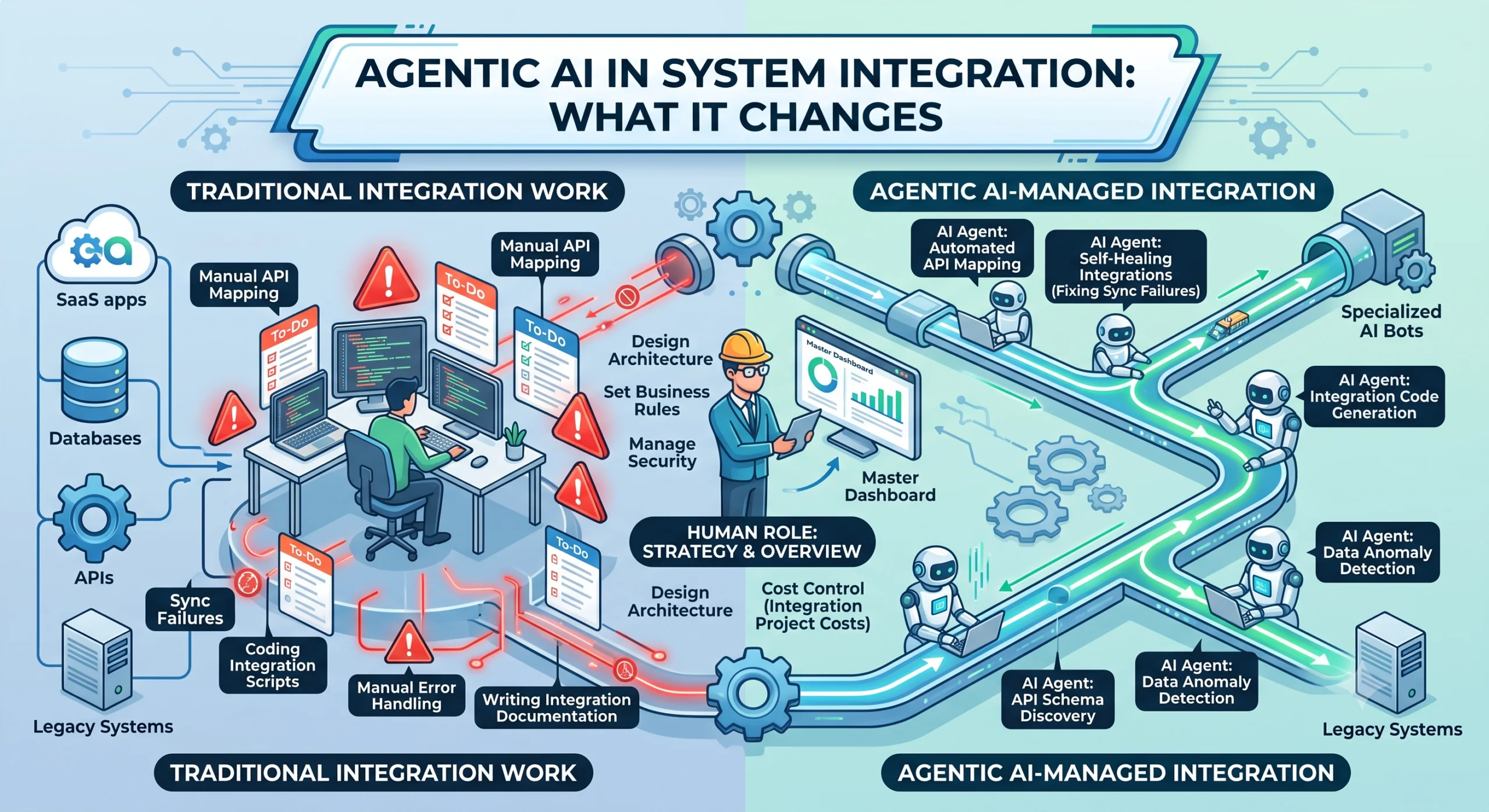
System integration is where most digital transformation budgets quietly disappear. The glamorous part is the new platform, the redesigned UI, the fresh data model. The unglamorous part is connecting that shiny new thing to the five legacy systems it has to talk to, handling the edge cases, and keeping it all running when third-party APIs change without notice.
We have spent years on integration projects at Helixz Solutions, and agentic AI is the first technology that genuinely changes the economics of this work. Not by replacing the engineer, but by taking on the repetitive grunt work that eats most of an integration budget.
The Traditional Integration Problem
Before we get to what changes, it helps to be honest about the problem. Here is what integration work actually involves on a typical project.
Mapping fields
System A calls it customer_id. System B calls it acct_no. System C calls it clientRef. Someone has to sit down, open both schemas, and build a mapping document. This is tedious, error-prone work that depends on domain knowledge and patience in equal measure.
Handling edge cases
The happy path takes a day to build. The edge cases take a week. What happens when a date comes in as a string instead of a timestamp? When a nullable field is suddenly required? When a currency code is lowercase? When an address field contains a whole JSON blob someone stuffed in there three years ago? Every integration is a long tail of “what if” handling.
Debugging sync failures
A sync breaks at 3am. The logs are cryptic. Was it authentication? A rate limit? A changed field? A timeout? Someone has to dig through logs, reproduce the issue, and patch it. Then it breaks again next week for a different reason.
Documentation that is always outdated
You write integration docs on day one. By day thirty the API has changed twice, the mapping has been patched four times, and the docs describe a system that no longer exists. Everyone knows the docs are wrong. No one has time to fix them. New team members onboard slowly because the source of truth lives in the head of the one engineer who built it.
If any of this sounds familiar, you have done integration work. Now let us look at where agentic AI changes the picture.
How AI Agents Help With Integration Work
Agentic AI is not magic, but it is genuinely useful for specific, well-scoped parts of integration work. Here is where we have seen it deliver.
Auto-discovering API schemas
When you point an agent at an API, it can probe the endpoints, read the responses, infer the schema, and produce a structured description of what the API offers. This is faster than reading incomplete docs, and it captures what the API actually does today, not what it did when someone last updated the wiki.
Generating integration code
Given a source schema and a target schema, an agent can draft the mapping code, including type conversions, null handling, and validation. A human reviews and adjusts, but the first draft, which used to take hours, now takes minutes. The agent also tends to handle the boring edge cases (date formats, currency rounding, empty arrays) more thoroughly than a tired engineer.
Detecting data anomalies
An agent monitoring a sync pipeline can spot when records look wrong before they cause downstream problems. A field that was always numeric now contains text. A record count that was steady suddenly drops by half. A field that was optional is now present on every record. These are signals that something upstream changed, and catching them early saves hours of debugging later.
Self-healing broken syncs
This is the one that gets the most attention, so let us be precise about what it means. “Self-healing” does not mean the agent magically fixes everything. It means the agent can:
- Detect that a sync failed.
- Read the error and the recent data to understand why.
- Attempt a fix: retry with adjusted parameters, remap a changed field, fall back to a secondary endpoint.
- If it cannot fix it, escalate to a human with a clear summary of what happened and what it tried.
This is useful because most sync failures are mundane: an expired token, a renamed field, a transient timeout. An agent that handles the mundane ones and escalates only the real problems saves significant on-call time.
Generating documentation
An agent that lives inside your integration pipeline can keep documentation current by design. Every time a mapping changes, every time a new endpoint is added, the agent regenerates the relevant docs from the actual running code. The docs describe the system as it is, not as it was. This alone justifies the effort for teams that have given up on keeping integration docs accurate.
Real Scenarios Where This Matters
Let us make this concrete with scenarios we have actually hit on client projects.
When a third-party API changes without notice
A payment provider updates their API on a Tuesday. They send an email that no one reads. Wednesday morning, your checkout sync starts failing. Without an agent, an engineer gets paged, digs through logs, finds the changed field, updates the mapping, tests, and deploys. Best case: two to four hours of downtime and lost engineer time.
With an agent monitoring the sync, it detects the field change, identifies the likely cause from the error pattern, drafts a revised mapping, and alerts the engineer with a suggested fix. The engineer reviews, approves, and deploys in twenty minutes. The agent did not fix it alone, but it compressed the time to resolution by handling the investigation.
When data formats shift
A client’s ERP starts sending dates in ISO 8601 instead of the legacy format they used for years. The integration code expects the old format and starts rejecting records. An anomaly-detecting agent spots the format change in the first batch, flags it, and drafts a conversion fix. The data team finds out from the agent’s alert, not from a downstream report that breaks.
When new endpoints need to be mapped
A new sales channel comes online and needs to feed orders into your fulfilment system. Traditionally this means a developer reads the new API docs, builds a mapping, writes the integration code, tests it, and documents it. An agent can draft all of this from the API spec in a fraction of the time. The developer reviews, tests edge cases, and ships. What was a week of work becomes a day.
What AI Agents Cannot Do Yet
This section matters as much as the rest. Agentic AI is not a replacement for engineering judgement. Here is where it falls short.
Understanding business context fully
An agent can see that two fields have the same name and map them. It cannot tell you whether mapping them is correct given your business rules. Is status in system A the same concept as status in system B? Sometimes yes, sometimes no, and the answer depends on context the agent does not have. A human still owns this decision.
Making judgement calls about data ownership
When two systems disagree on a value, which one wins? The agent cannot decide. Data ownership is a business decision, often a political one. The agent can surface the conflict and present the options, but the call belongs to a person who understands the business implications.
Replacing human review for critical paths
For anything that touches money, customer data, or compliance, human review is non-negotiable. An agent can prepare the work, draft the changes, and flag the risks, but a human signs off. The value is in compressing the preparation, not removing the reviewer.
Handling novel failure modes
Agents are trained on patterns they have seen. When something genuinely novel happens, a security incident or a vendor outage with cascading effects, the agent may not recognise it or may apply the wrong fix. This is exactly when you need a human in the loop.
The Hybrid Approach: AI Handles the Grunt Work, Humans Handle the Decisions
The working model we have settled on is simple. Agents handle the repetitive, well-scoped work. Humans handle judgement, context, and accountability.
Concretely, that looks like this:
- Agent tasks: Schema discovery, code drafting, anomaly detection, first-pass debugging, documentation generation, routine retry logic.
- Human tasks: Approving mappings for critical data, deciding data ownership, reviewing agent output for anything irreversible, handling novel incidents, defining the boundaries of what the agent can do.
The split is not fixed. As trust builds and patterns repeat, more moves to the agent side. But the human checkpoint for anything critical stays. This is how you get the speed benefits without the risk.
How This Changes the Economics of Integration Projects
Integration budgets break down roughly like this on a typical project: 20% happy path, 50% edge cases and debugging, 20% documentation and maintenance, 10% ongoing support. The largest chunk is the unglamorous middle.
Agentic AI attacks that middle. If an agent drafts the mapping code, handles the common edge cases, and keeps docs current, you cut the most expensive part of the project significantly. We have seen integration projects come in 30 to 50% faster on the build side, with fewer post-launch incidents because the agent catches anomalies early.
The cost shift is real. You spend less on manual mapping and debugging, and more on agent setup and guardrails. The net is lower, and teams that invest in agent infrastructure early see compounding returns as each new integration reuses the same pipeline.
Practical Steps to Introduce Agentic AI Into Your Integration Workflow
If you want to start, here is a path that minimises risk.
- Start with schema discovery on one integration. Point an agent at an API you already use and have it generate a schema description. Compare it to your existing docs. This is low-risk and builds familiarity.
- Add anomaly detection to one sync pipeline. Let the agent watch a sync you already run and flag anomalies. Review its alerts for a few weeks to calibrate trust before you let it take any action.
- Let the agent draft code for a new mapping. On the next integration, have the agent generate the first draft. A human reviews and ships. Measure the time saved versus doing it manually.
- Introduce self-healing for the most common failure mode. Pick the failure that causes the most on-call pain, usually an expired token or a transient timeout. Let the agent handle that one and escalate the rest.
- Set up agent-generated documentation. Point the agent at your running integrations and have it maintain the docs. This pays off fast and makes onboarding easier.
- Define boundaries clearly. Write down what the agent can do alone, what needs human approval, and what is off limits. Review these boundaries quarterly as trust and capability grow.
- Monitor cost and accuracy. Track what each agent task costs in model calls and what accuracy it achieves. Adjust the split based on data, not gut feel.
Examples: Integration Scenarios Where Agents Earned Their Keep
Scenario 1: The CRM to ERP sync
A client synced customer records from their CRM to their ERP nightly. The sync broke every few weeks because the CRM’s custom fields kept changing as the sales team added new fields. An agent now monitors the schema, detects new or changed fields, drafts updated mappings, and flags them for a developer to review. Downtime from field changes dropped to near zero.
Scenario 2: The multi-currency reconciliation
A fintech client reconciled transactions across four systems, each with different currency handling. Manual mapping was error-prone and someone was always firefighting rounding discrepancies. An agent drafts the conversion logic, applies it consistently, and flags only genuine mismatches. The finance team reviews exceptions instead of every batch.
Scenario 3: The undocumented legacy API
A client needed to integrate with a partner’s legacy API that had no documentation and one person who understood it. An agent probed the endpoints, inferred the schema, and produced a working description. What would have been weeks of reverse-engineering took a couple of days.
FAQ
Will agentic AI replace integration engineers?
No. It changes what they spend time on. Less manual field mapping and debugging, more architecture, review, and handling novel cases. The judgement work stays with the engineer. The agent handles the repetitive parts that consume most of the hours today.
Is self-healing integration safe for production?
Safe, with boundaries. Let the agent handle mundane, reversible failures like expired tokens and transient timeouts. Anything that touches data integrity, money, or customers needs a human checkpoint. Define what the agent can fix alone and escalate everything else with a clear summary.
How much does agentic AI reduce integration project costs?
It varies, but we have seen 30 to 50% reduction in build time where the agent handles schema discovery, code drafting, and documentation. The savings come from compressing the edge-case and debugging work, which is the largest part of most integration budgets.
Do we need clean APIs for agentic AI to work?
Cleaner APIs help, but agents are specifically useful for messy, undocumented ones. Schema discovery works better when the API is consistent, but the value is highest when it is not. That said, the agent still needs reliable authentication to probe the endpoints.
What is the biggest mistake teams make with agentic AI in integration?
Letting the agent act on production without a human checkpoint. The agent can draft, detect, and suggest, but for anything irreversible, a human must approve. Skipping this is how you get data corruption that takes days to unwind.
Conclusion
System integration is the part of digital transformation that everyone underestimates and no one enjoys. Agentic AI does not make it disappear, but it makes it faster, cheaper, and less fragile. Agents handle the schema discovery, code drafting, anomaly detection, and documentation work that eat integration budgets. Humans handle the judgement and accountability that agents cannot.
The hybrid approach is the one that works. Start with one low-risk integration task, let the agent draft and detect while a human reviews, and expand as trust builds. Measure the savings, and reinvest them in the architecture work that moves a transformation forward. That is the path we have taken with our clients.


