

Custom Integration Case Study: Legacy Migration Lessons
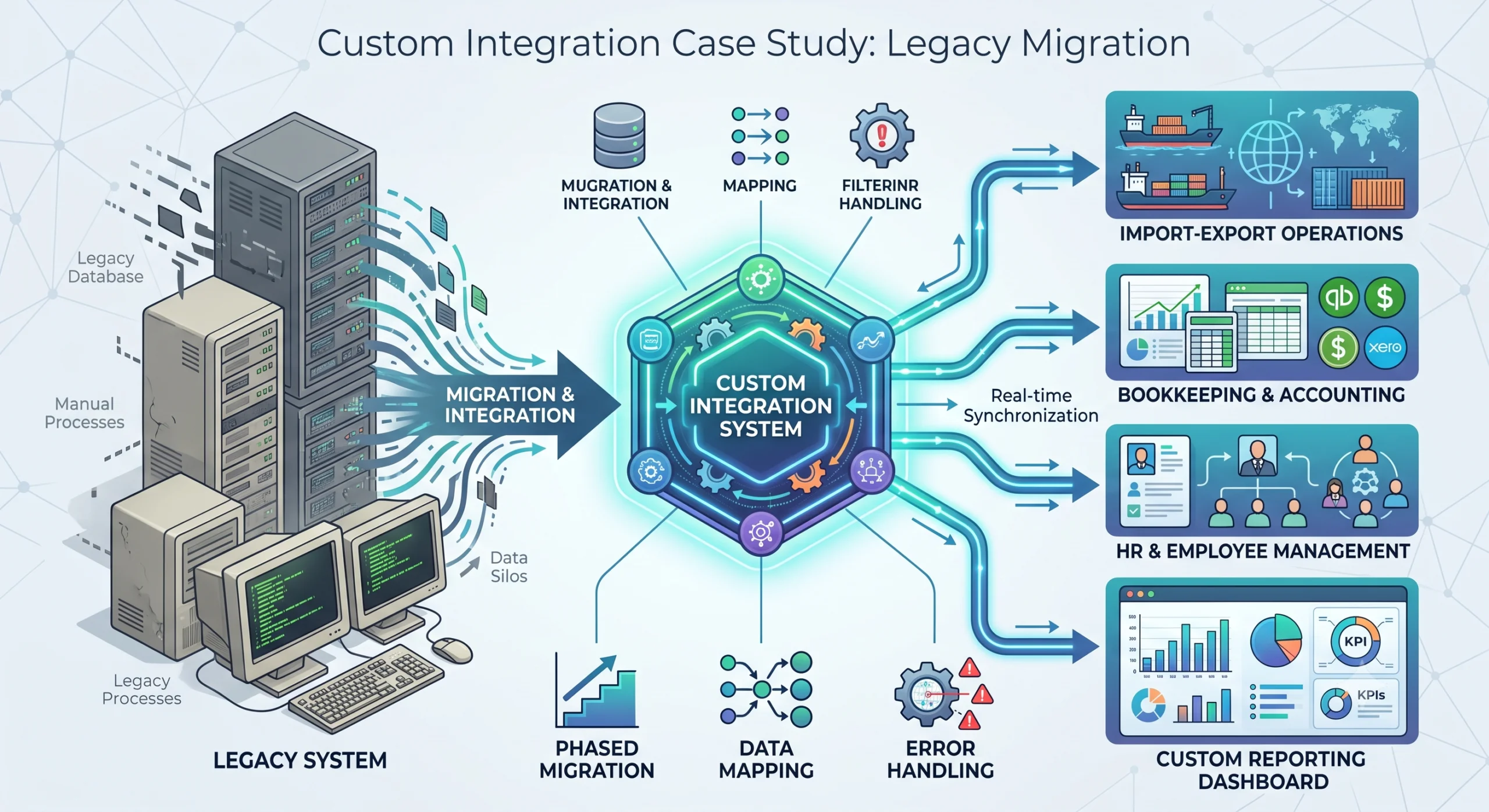
A large Sri Lankan import-export company came to us with a problem that should sound familiar. They had a legacy system holding their core operational data, and it could not talk to anything else. Bookkeeping lived in one tool. Employee management lived in another. The legacy system sat in the middle, isolated, with staff manually copying numbers between systems all day.This post walks through what we actually did, the parts that worked, the parts that hurt, and what we would do differently if we started over.
The Client and the Problem
The company operates across three sectors: metal, textile, and chemical imports and exports. That means shipments, customs paperwork, supplier payments, employee time tracking, and financial reconciliation all running in parallel, every day.
Their legacy system had been in place for years. It stored shipment records, inventory movements, and supplier data. On its own, it functioned. The problem was everything around it.
- The bookkeeping system had no connection to operational data. Finance staff retyped invoice totals and shipment costs by hand.
- The employee management system had no link to operational work. Productivity reporting meant spreadsheets emailed back and forth.
- Manual entry created errors. Wrong decimal places, duplicated rows, missing shipments. Each error took hours to trace and fix.
- Reporting was reactive. By the time someone built a monthly summary in Excel, the data was already two weeks old.
The company did not need a flashy new product. They needed their systems to share data, on schedule, with checks in place. That is the work we took on.
Our Approach: Understand Before You Code
The first instinct on a project like this is to start mapping APIs and writing sync jobs. We did not do that. We spent the first phase understanding the existing processes.
We sat with the operations team and watched how a shipment moved through the system. We tracked a single metal shipment from supplier invoice, through customs, to warehouse receipt, to the finance team’s books. We did the same for textile and chemical flows.
That exercise changed our plan. We had assumed the legacy system was the source of truth for shipment data. It was not. The operations team kept a parallel spreadsheet for chemical shipments because the legacy system could not handle batch numbers the way they needed. Any integration we built would have to account for that, or we would lose data.
Lessons from this phase:
- Map the actual process, not the documented process. The two are rarely the same.
- Find the shadow systems. Spreadsheets, side databases, and manual workarounds exist because the official system has gaps.
- Talk to the people doing the data entry. They know where the errors come from better than anyone.
Only after we understood the real flows did we start designing the integration.
Phased Migration, Not Big Bang
We did not rip out the legacy system in one go. A big bang migration on a company this size would have stopped operations for days and risked data loss nobody could afford.
Instead, we phased it.
Phase 1: Stand up the new system alongside the legacy system. We built the new operational system and ran it in parallel. New shipments went into both systems. This let us validate that the new system handled the data correctly without committing to it fully.
Phase 2: Build the bookkeeping integration. Once the new system had live data, we connected it to the bookkeeping software. This was the highest-value integration because finance was spending the most time on manual entry.
Phase 3: Build the employee management integration. With bookkeeping stable, we added the link to the employee management system for productivity tracking.
Phase 4: Cut over. Only when all integrations were running and verified did we stop entering data into the legacy system.
Each phase had a rollback plan. If the bookkeeping integration started sending bad data, we could disable the sync and fall back to manual entry for a day while we fixed it. That safety net mattered more than speed.
The Integration Work
This was the core of the project. Three pieces: the new operational system, the bookkeeping system, and the employee management system. Each connection had its own challenges.
Connecting to the Bookkeeping System
The bookkeeping software had an API, but it was not designed for the volume or the shape of data we needed to push. Invoice records in the operational system did not map cleanly to the journal entry structure the bookkeeping system expected.
We had to build a data mapping layer. Each operational invoice became one or more journal entries, with account codes resolved based on shipment type and cost category. Metal shipments hit different accounts than textile shipments.
Key decisions we made:
- Sync schedule: We ran the bookkeeping sync every 15 minutes during business hours. Real-time was unnecessary and would have overloaded the bookkeeping API. A 15-minute lag was acceptable to finance.
- Idempotency: Every sync record carried a unique reference. If the sync ran twice, the bookkeeping system would not create duplicate entries. This single decision prevented most of the data corruption issues we would have hit otherwise.
- Reconciliation reports: After each sync, we generated a report comparing what the operational system sent against what landed in the bookkeeping system. Discrepancies went to a queue for manual review.
Connecting to the Employee Management System
The employee management integration was different. Its job was to pull operational work data so productivity could be tracked per employee, per department, per shipment type.
The challenge here was identity. The operational system tracked work by shipment reference and team. The employee management system tracked work by employee ID. We needed a mapping between the two.
We solved this by adding an employee ID field to operational records at the point of entry. When a team member logged work on a shipment, they selected their employee ID from a dropdown sourced from the employee management system. That gave us a reliable join.
This required a change in the operations team’s workflow. They had to select themselves when logging work, which they had not done before. We learned that integrations often force process changes, and you have to plan for the human side of those changes, not just the technical side.
Error Handling
Error handling was where we spent more time than we estimated. Integrations fail in predictable and unpredictable ways.
We built a sync status dashboard that tracked every sync run. Each run had a status: success, partial failure, or full failure. Failures were categorized:
- Data validation errors: A record failed because required fields were missing or malformed. These went to a review queue for the operations team to fix.
- API errors: The target system rejected the request due to a temporary issue. These retried automatically with backoff.
- Mapping errors: A record could not be mapped because it matched no known category. These flagged for us to update the mapping rules.
The dashboard let both our team and the client see what was happening. No silent failures. If something broke, someone knew within minutes.
Custom Reporting and Dashboards
The integrations gave us clean, connected data. The reporting layer made that data useful.
We built three dashboards.
Shipment Tracking Dashboard
A real-time view of every shipment across all three sectors. Status, current location (where tracking data was available), customs stage, and expected arrival. Filterable by sector, supplier, and date range.
This replaced a weekly spreadsheet that two staff members spent most of Monday building.
Financial Reconciliation Dashboard
A view comparing operational financial data against bookkeeping data. Invoices sent, payments received, and outstanding balances, with discrepancies highlighted. Finance could see at a glance where the books did not match operations.
This dashboard caught a recurring error in how the legacy system had been recording textile shipment costs. The error had been invisible for months because no one had a side-by-side view.
Employee Productivity Dashboard
Work volume per employee, per sector, per week. Not for surveillance. For resource planning. The operations manager used this to see which teams were overloaded and which had capacity.
Lessons Learned
We got a lot right. We also got some things wrong. Here is the honest list.
What Went Wrong
- We underestimated the data cleanup. The legacy system had years of inconsistent data. Duplicate supplier records, misspelled product names, missing dates. We thought we could clean as we went. We should have done a dedicated cleanup phase before starting the integrations.
- The employee ID change took longer than expected. Operations staff resisted the extra step of selecting their ID. We should have involved them earlier in the design and explained why the change mattered.
- We built the reconciliation reports too late. We added them after the first sync failures caused confusion. They should have been part of the initial sync design, not a reaction to problems.
What We Would Do Differently
- Start with a data audit. Before any integration work, spend time understanding data quality and cleaning what you can.
- Bring end users into the design process for any workflow change an integration forces. Do not surprise them.
- Build monitoring and reconciliation from day one. Treat them as part of the integration, not an add-on.
Examples From the Project
A few specific scenarios illustrate how the integration handled real situations.
Scenario 1: A chemical shipment with split costs. A single chemical shipment had freight, customs duty, and local transport costs billed separately. The bookkeeping integration mapped each cost to the correct expense account based on cost type, not shipment type. Without the mapping layer, all costs would have landed in one account and broken the financial reports.
Scenario 2: A duplicate invoice in the legacy system. During parallel running, the same invoice appeared twice in the operational system. The idempotency check on the sync caught it. The second copy flagged as a duplicate and went to the review queue instead of creating a double entry in the books.
Scenario 3: A mapping gap on a new textile supplier. A new supplier had no category mapping. The sync flagged the records as mapping errors. We added the mapping rule, and the queued records synced on the next run without data loss.
FAQ
How long did the full migration take?
The phased approach took 3 months from the first process mapping session to full cutover. The bookkeeping integration alone took about a third of that time, mostly because of data mapping and reconciliation work.
Why not replace the legacy system and the bookkeeping system at the same time?
Too much risk. Replacing two core systems at once means two sets of unknowns. If something breaks, you cannot tell which system caused it. Phasing isolates risk and gives you a rollback path at each step.
How did you handle data that existed in the legacy system but not in the new system?
We did a one-time historical data migration for records the client needed to keep accessible. Not everything came over. We worked with the client to identify which historical data was actually used and migrated only that. Old data that no one referenced stayed in the legacy system in read-only mode.
What happens when a sync fails mid-run?
Each sync run is atomic per record. If the sync processes 100 records and fails on record 47, records 1 through 46 are committed, record 47 goes to the error queue, and records 48 through 100 process on the next run. No partial or corrupt states in the target system.
Can this approach work for smaller companies?
Yes, with adjustment. The phased approach and the emphasis on understanding processes before coding apply at any scale. A smaller company might skip the parallel running phase and move faster, but the integration principles, idempotency, reconciliation, and error handling, stay the same.
Conclusion
Developing a custom integration system relies far more on discipline than on the technology itself. Successful integrations are grounded in a deep comprehension of the interconnected processes, whereas failures typically stem from unverified assumptions. Furthermore, given today’s landscape with Agentic AI, the time required to replace a legacy system can be reduced by more than half.
If you take one thing from this case study: spend more time than you think you need understanding the existing process and data before you write a single line of integration code. Every hour spent there saves multiple hours of rework later.
At Helixz Solutions, we approach every integration project this way. Process first, code second, monitoring throughout. It is slower at the start and faster where it counts.


